Cemeteries Come to Life!
Written By: Nicole Barbiaux
Post Date: 10-22-2025
While the exact number is unknown, there is said to be between 2,700 to 2,800 cemeteries within Wisconsin. Each one consists of headstones to maintain, individual ownership of cemetery lots and too many burials to count. Cemetery management has long been a challenge for communities. It’s a big responsibility. Not only are cemetery records often kept in old record books that may be falling apart or getting harder to read, but there are also questions such as how many burials are in a cemetery, who is buried where, or how many plots are still available for purchase? The use of Geographic Information Systems (GIS) can assist in not only knowing where individual plots and grave sites are located but also help preserve records for years to come.
Cemetery Record Preservation
The first step in creating a cemetery database is to digitize cemetery records. What is considered a cemetery record? This can include lot ownership, burials, dates, veteran status, notes, and more. Whether this information is stored in old ledger books, individual notebooks, or on an old lunch napkin from the 1970’s, all records should be entered into a spreadsheet to make it legible to read and also perverse that record as a backup. Documenting this information into a digital format creates a sustainable management system that can be preserved and passed along to future stewards. The image below shows an example of records separated into The Where, The Who, and The Owner of burials within a cemetery into a spreadsheet format. This allows for easy filtering and ordering of the data.

What if there are no cemetery records available? While there may be lost records of a cemetery, the cemetery still has a history to share. Information can be gathered by performing an inventory and documenting what headstones say within the cemetery. Even if a headstone in the cemetery has no information, there is still a burial which can be marked as such with an “unknown” in the related information. Members of the community are also a great resource! Notifying the public of the cemetery project and asking for any related information can help fill in those missing pieces for unknown burials or areas of the cemetery that might be missing records. Local funeral directors may also have information which could assist with gathering information. Who knows, someone might end up volunteering to assist with the project by organizing records or doing field verifications.
Advancing Technology
The next step is to create GIS data to represent the cemetery layout in a geospatial format. Advancing technology can help with this. All Wisconsin counties now have high resolution aerial imagery that shows gravestones within the cemetery. Surveying and GPS can assist in the creation of a cemetery plat and/or accurately locate known burial locations to place on a map. Light Detection and Ranging (LiDAR) is even being used to detect burial mounds in cemeteries or in other locations where they might not be marked. Drones can be used to capture high resolution aerial imagery and/or LiDAR. Finally, the use of Ground Penetrating Radar (GPR) can use radio waves to create images of below the surface anomalies which can include unmarked graves to locate those unknown burial locations.
Cemetery Map Layout
Advanced technology is bringing new heights to cemetery mapping; however, a cemetery layout does not need to be created with this advanced technology. A layout can be created on a simple Excel spreadsheet by using the different cells to represent individual burial plots. By symbolizing the cells a different color, each plot can represent if the plot has been purchased, if a burial is located there and if so, how many burials. The cemetery layout should be labeled into known sections, blocks, and plots to better match the cemetery records. Below is an example of a cemetery layout created in Excel outline the blocks and individual plots that are color coded to match the burial status of each plot.

Use GIS to Join and Show Records on an Interactive Display
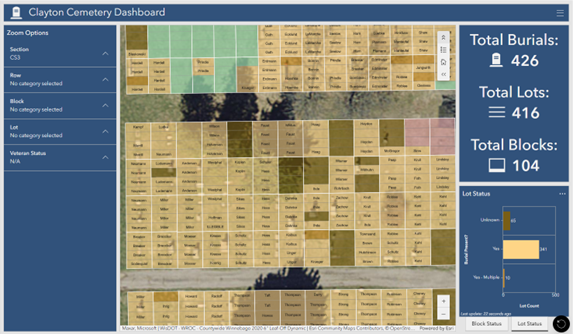
The last step is to connect the records with the cemetery map layout. In GIS, this is known as a relationship between the two datasets. When a relate is made, any plot can be viewed and the status of the plot including any burial records present will be shown. Interactive online maps and dashboards can be created to help manage this data allowing communities to quickly view the status of cemeteries. Questions such as how many burials are in a cemetery, where are available plots for purchase located, or how to quickly find where someone is buried within the cemetery can easily be answered by these online platforms.
The Town of Clayton (Winnebago County) recently created an online Clayton Cemetery Dashboard that allows them to do just that. With a couple clicks of a button, the Town can now navigate to any section of the cemetery and know where plots are available to be sold, where burials are located (and who is buried there) and has the ability to edit any record. The Town also has the ability to locate where all the veterans are buried and service information.

The online map can be shared with members of the public or be kept for internal viewing and editing purposes. In either case, the data is organized in one central location and can be managed from a desktop or through a mobile device allowing easy field verification and editing within the cemetery.

The idea of organizing cemetery records can be overwhelming for communities. Taking small steps such as digitizing records and making a map layout of the cemetery can go a long way in terms of implementing a cemetery management system. It’s also a very respectful way to recognize our departed whether a family member, veteran or local leader, there are stories to be told in every cemetery. If your community is ready to take that step but don’t know where to begin, Cedar can help!